zephiX, did you write this?
Attempts at manually patching PS4 games for PS5 [60 FPS etc.] (30.12.2025)
TL;DR: If you want to permanently add patches to PS4 games, use a hex editor and set "3FC000" as the base address for the decrypted eboot.bin file (or subtract it from one provided in the xml file for your specific title, that'll give you the same result).
For the last few months, I tried to mod every video game console in my collection, including from the newest generation, the PS5. I stopped updating to the newest firmware around last year in the hopes that some day I can play Bloodborne at those sweet, sweet 60 frames per second.
And recently, that wish came true, with the Lapse exploit paired with an imported Lua game, I could finally make it happen. But, there was a sliiiight problem.
See, I am right now using the 9.60 firmware on the PS5 and applying the patches that can bring the smooth experience aren't possible, since the seemless enabling is working only on slightly older firmwares and isn't currently supported on the one that I have.
There is not enough information on the web, other than just, applying them through Itemzflow or PS4 Cheats Manager, but there was an option to just hardcode it into the game itself. So that's what I set out to do.
My goal was to make Bloodborne and P.T. run at 60 FPS on my PS5.
Luckily, Bloodborne was straight forward, I got ahold of the original patcher made by Lance McDonald and used that on my backed up copy. But the hard part, atleast for me, was doing it for P.T. I was somewhat familiar with hex editing in the past, I thought it couldn't be bad. Turns out it was. A little bit.

The confusion
For some reason, I couldn't make it work, I replaced the needed bytes in the directories and it just, did not work at all. What was I doing wrong, was there something I just didn't see? The answer was right in front of me. The patcher for Bloodborne already did the heavy lifting, so what I had to do was just look for where the necessary bytes were written.
And what I found was interesting. Turns out the address that is included in the patch listing was different from the actual one that was used. I stumbled upon a tutorial from MODDED WARFARE that showed how to permanently add cheats to PS4 games. It didn't translate fully to what I was doing, but there was this one crucial detail.
He showed that in order to find the right place, you need to find the actual start of the EBOOT.BIN file, in his case, it was the "libexec" string. And from that point you needed to add the address to the one where the string was located. (for example, "libexec" was located at the "4000" line but the code offset was "A123", add them together and you get the location "E123")

The bad

The good
By that point it clicked, all I had to do was to just subtract the xml file address from the actual one and I got this: 3FC000. This was it. The secret ingredient. Tested the patches for P.T. and it finally, finally worked. But one question remained: Why couldn't I get information about this?
Maybe it is because most people are on those older firmwares that can still use these patches, use other means (like a PS4 Pro or shadPS4) or they just don't care all that much, but after I did the patching I found another tutorial from the same YouTuber and it was the solution I was looking for the whole time. "Why did it come up now, after this much trouble?!", I said to myself. Maybe I just didn't look in the right direction, but it turns out that the program used in the video was not updated since 2022 and is archived.
So I looked further into this, because I figured that it can still be used today (with a little bit of tinkering and some willpower) and, surprise surprise, the offset I found is used in the program aswell.
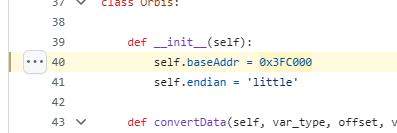
The code
There are two options now. The first being making a repo of the up to date patches converted back to the original ones (illusion migrated from the yml format to xml some time ago) to use with this legacy program. Or use a hex editor and set up "3FC000" as the base address. The choice is yours.